 AI Marketing Team
More Reviews
Stronger Reputation
More Customers
AI Marketing Team
More Reviews
Stronger Reputation
More Customers

Email Widgets
5-Star Reviews In
Every Email You Send.
Turn every email you send
into an oppourtunity to get
more Google reviews. Our Email Widgets add a professional star rating and review link to your email signature automatically.
More visibility
More trust
More 5-star Google reviews
Email Widgets
5-Star Reviews In Every Email You Send.
Turn every email you send into an oppourtunity to get more Google reviews. Our Email Widgets add a professional star rating and review link to your email signature automatically.
More visibility
More trust
More 5-star Google reviews
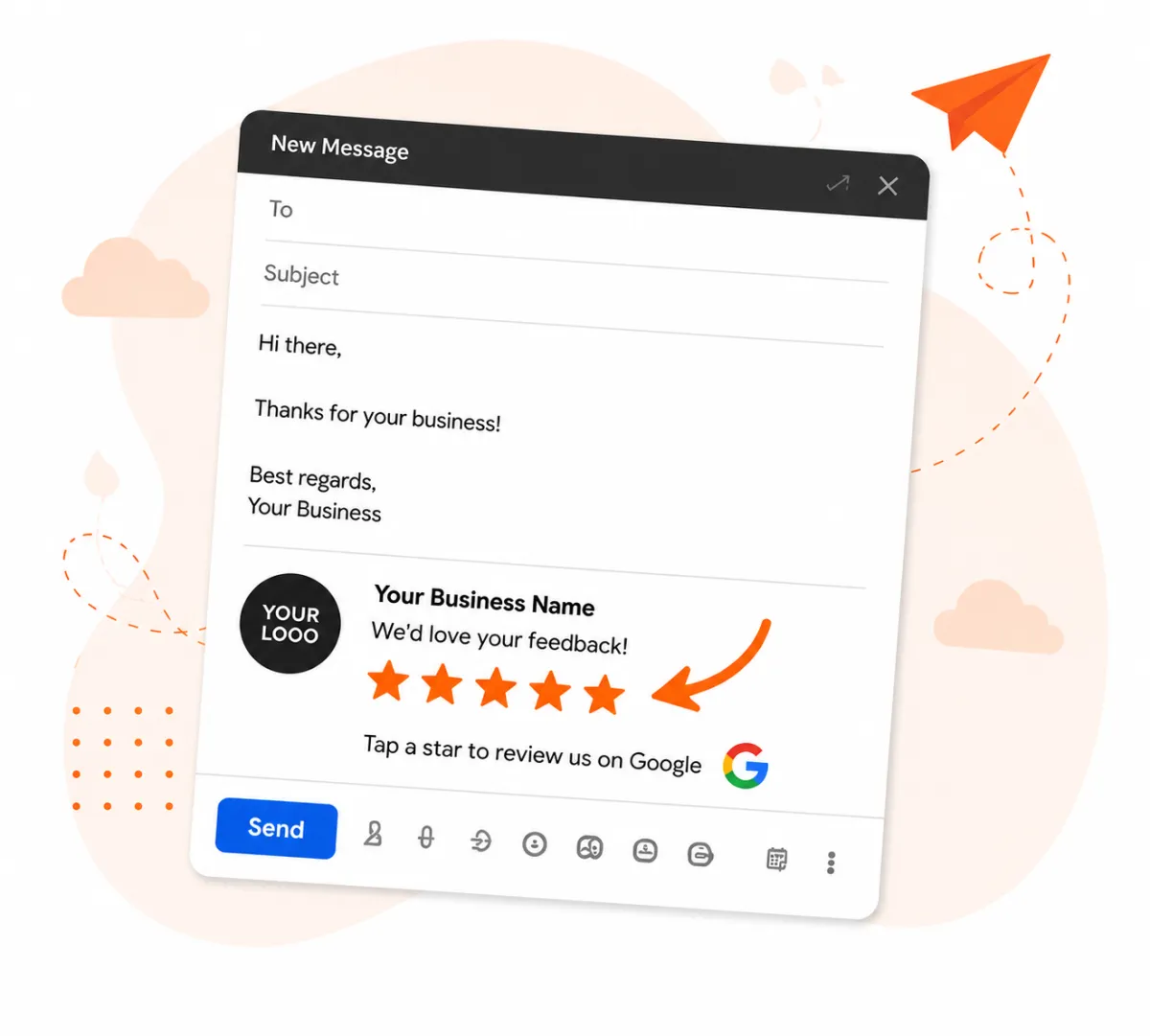
Email Widgets
5-Star Reviews In Every Email You Send.
Turn every email you send into an oppourtunity to get more Google reviews. Our Email Widgets add a professional star rating and review link to your email signature automatically.
More visibility
More trust
More 5-star Google reviews
Simple Setup —
No Tech Skills Needed
1. Fill out the short form below.
2. Copy and paste your unique widget code into your email signature.
3. Start collecting 5-star reviews automatically.

How It Works
This should be at the bottom of all your company emails.
Tap on any of the stars below to see how it works.
Your message will go here.

Or your message could go here.
Low Star Feedback
Clicking 1–3 stars lets your recipient send private feedback directly to you.
They can leave a short message or just their star rating. If you have staff, All versions include the staff email that the feedback relates to.
The reviewer is told that their feedback goes only to you, not the sender of the email — useful for training and customer care.
Google Review Boost
When 4 or 5 stars are clicked, your email recipient is taken directly to your Google Reviews link to leave a review.
This helps boost your online ranking and reputation.
Why You'll Love Email Widgets

More 5-Star Reviews
Make it easy for happy customers to leave you glowing reviews.

Works Automatically
Added to every email you send - no extra work for you.

Boosts Your Business
More reviews leads to more visibility and more customers.

Quick & Easy Setup
Get your widget set up in under 5 minutes.
Simple Setup — No Tech Skills Needed
1. Fill out the short form below.
2. Copy and paste your unique widget code into your email signature.
3. Start collecting 5-star reviews automatically.
How It Works
This should be at the bottom of all your company emails.
Click on any of the stars to see how it works.
Your call to action will go here.
Or your call to action could go here.
Low Star Feedback
Clicking 1–3 stars lets your recipient send private feedback directly to you.
They can leave a short message or just their star rating. If you have staff, All versions include the staff email that the feedback relates to.
The reviewer is told that their feedback goes only to you, not the sender of the email — useful for training and customer care.
Google Review Boost
When 4 or 5 stars are clicked, your email recipient is taken directly to your Google Reviews link to leave a review.
This helps boost your online ranking and reputation.
Why You'll Love Email Widgets
More 5-Star Reviews
Make it easy for happy customers to leave you glowing reviews.
Works Automatically
Added to every email you send - no extra work for you.
Boosts Your Business
More reviews leads to more visibility and more customers.
Quick & Easy Setup
Get your widget set up in under 5 minutes.
Simple Setup — No Tech Skills Needed
1. Fill out the short form below.
2. Copy and paste your unique widget code into your email signature.
3. Start collecting 5-star reviews automatically.
How It Works
This should be at the bottom of all your company emails.
Click on any of the stars to see how it works.
Your message will go here.
Or your message could go here.
Low Star Feedback
Clicking 1–3 stars lets your recipient send private feedback directly to you.
They can leave a short message or just their star rating. If you have staff, All versions include the staff email that the feedback relates to.
The reviewer is told that their feedback goes only to you, not the sender of the email — useful for training and customer care.
Google Review Boost
When 4 or 5 stars are clicked, your email recipient is taken directly to your Google Reviews link to leave a review.
This helps boost your online ranking and reputation.
Why You'll Love Email Widgets
More 5-Star Reviews
Make it easy for happy customers to leave you glowing reviews.
Works Automatically
Added to every email you send - no extra work for you.
Boosts Your Business
More reviews leads to more visibility and more customers.
Quick & Easy Setup
Get your widget set up in under 5 minutes.
Pricing
Standard
1 - 3 Email Widgets
$5 per month each
or
$50 per year each
+GST
Business
4 - 9 Email Widgets
$4 per month each
or
$40 per year each
+GST
Enterprise
10 - 50 Email Widgets
$3.50 per month each
or
$35 per year each
+GST
Quick Reviews monthly plan partners may qualify for free widgets — check on the form to the right.
You will need your Quick Reviews review link.
⭐ Quick Reviews – Email Widget Setup
Set up your personalized email widget below. Once submitted, you’ll receive an email containing your ready-to-copy widget code.
How to get your Quick Reviews Review Link
- Click here and log in to Quick Reviews.
- Click Review Link in the left sidebar.
- At the bottom of the page, click Visit Link.
- Copy the full URL from your browser’s address bar.
- Paste it into the box on this form.
How to get your Google Review Link
- You must be the owner or manager of your Google Business Profile and be logged into Google.
- Open your Google Business Profile Manager.
- Click “Ask for reviews” near the top.
- Copy your Review link and paste it here.
- Or, open Google Maps → Search your business name → Manage Profile → Get more reviews → Copy link.
Pricing
Standard
1 - 3 Email Widgets
$5 per month each
or
$50 per year each
+GST
Business
4 - 9 Email Widgets
$4 per month each
or
$40 per year each
+GST
Enterprise
10 - 50 Email Widgets
$3.50 per month each
or
$35 per year each
+GST
Quick Reviews monthly plan partners may qualify for free widgets — check on the form to the right.
You will need your Quick Reviews review link.
⭐ Quick Reviews – Email Widget Setup
Set up your personalized email widget below. Once submitted, you’ll receive an email containing your ready-to-copy widget code.
How to get your Quick Reviews Review Link
- Click here and log in to Quick Reviews.
- Click Review Link in the left sidebar.
- At the bottom of the page, click Visit Link.
- Copy the full URL from your browser’s address bar.
- Paste it into the box on this form.
How to get your Google Review Link
- You must be the owner or manager of your Google Business Profile and be logged into Google.
- Open your Google Business Profile Manager.
- Click “Ask for reviews” near the top.
- Copy your Review link and paste it here.
- Or, open Google Maps → Search your business name → Manage Profile → Get more reviews → Copy link.
Pricing
Standard
1 - 3 Email Widgets
$5 per month each
or
$50 per year each
+GST
Business
4 - 9 Email Widgets
$4 per month each
or
$40 per year each
+GST
Enterprise
10 - 50 Email Widgets
$3.50 per month each
or
$35 per year each
+GST
Quick Reviews monthly plan partners may qualify for free widgets — check on the form to the right.
You will need your Quick Reviews review link.
⭐ Quick Reviews – Email Widget Setup
Set up your personalized email widget below. Once submitted, you’ll receive an email containing your ready-to-copy widget code.
How to get your Quick Reviews Review Link
- Click here and log in to Quick Reviews.
- Click Review Link in the left sidebar.
- At the bottom of the page, click Visit Link.
- Copy the full URL from your browser’s address bar.
- Paste it into the box on this form.
How to get your Google Review Link
- You must be the owner or manager of your Google Business Profile and be logged into Google.
- Open your Google Business Profile Manager.
- Click “Ask for reviews” near the top.
- Copy your Review link and paste it here.
- Or, open Google Maps → Search your business name → Manage Profile → Get more reviews → Copy link.
Email Rating Widget – Frequently Asked Questions
What does the Email Rating Widget do?
The Quick Reviews Email Rating Widget lets your customers rate their experience directly from your emails — with just one click. Every email you send becomes a chance to collect genuine feedback or a new Google review.
Do I need to be a Quick Reviews customer to use it?
No — anyone can use it. However, if you’re already on a Quick Reviews plan, you may qualify for free widgets depending on your plan level. Just enter your Quick Reviews link in the form and it’ll automatically check for you.
What if I’m not a Quick Reviews customer yet?
No problem! You can still purchase widgets through our checkout. Prices start from just $5 per month per widget, and setup takes less than a minute.
How many free widgets do I get?
Free widgets depend on your Quick Reviews plan:
• Starter: 0 widgets
• Starter +: 1 widget
• Growth: 5 widgets
• Pro: 20 widgets
• Elite: 50 widgets
If you’ve reached your free limit, the form will automatically switch to a paid option.
Can I upgrade or downgrade my plan later?
Absolutely. If you decide to add more widgets, the system will automatically recognise your new total and move you to the plan that offers the best value — no double billing. If you ever remove widgets, your subscription will adjust on your next billing cycle.
(Coming soon: automatic upgrade/downgrade handling directly through your dashboard.)
What happens if my payment fails or I stop my subscription?
If Stripe reports a failed payment or cancellation, your widgets will automatically pause. They’ll reactivate instantly once payment resumes — no data lost, no need to reinstall.
(Suspension automation feature launching soon.)
Can I reassign a widget to another team member?
Yes! If a staff member leaves, you’ll be able to reassign their widget to a new email address directly from your Manage Preferences link. That link will be included in your setup email when you first receive your widgets.
What if I lose my Manage Preferences email?
Go to the Quick Reviews NZ website and click Email Widget Link in the website menu. Follow the instructions there to retrieve your secure dashboard link.
Which email platforms do the widgets work with?
Quick Reviews Email Widgets work with popular email platforms including Gmail, Outlook, Apple Mail and many webmail services.
Will I see my star ratings and feedback somewhere?
Yes — every widget sends results straight to your Quick Reviews dashboard (if you’re a customer) or to your feedback email for manual tracking. We’re also building a lightweight reporting page for standalone users.
How do I get started?
Scroll up, fill out the short form, and click the Get My Email Widgets Now button. If you’re already a Quick Reviews customer, the system will recognise you automatically and show your free allowance. Otherwise, you’ll be taken to checkout to complete your order securely via Stripe.
Still have questions?
Send us an email at info@quickreviews.co.nz — we’re always happy to help.
Email Rating Widget – Frequently Asked Questions
What does the Email Rating Widget do?
The Quick Reviews Email Rating Widget lets your customers rate their experience directly from your emails — with just one click. Every email you send becomes a chance to collect genuine feedback or a new Google review.
Do I need to be a Quick Reviews customer to use it?
No — anyone can use it. However, if you’re already on a Quick Reviews plan, you may qualify for free widgets depending on your plan level. Just enter your Quick Reviews link in the form and it’ll automatically check for you.
What if I’m not a Quick Reviews customer yet?
No problem! You can still purchase widgets through our checkout. Prices start from just $5 per month per widget, and setup takes less than a minute.
How many free widgets do I get?
Free widgets depend on your Quick Reviews plan:
• Starter: 0 widgets
• Starter +: 1 widget
• Growth: 5 widgets
• Pro: 20 widgets
• Elite: 50 widgets
If you’ve reached your free limit, the form will automatically switch to a paid option.
Can I upgrade or downgrade my plan later?
Absolutely. If you decide to add more widgets, the system will automatically recognise your new total and move you to the plan that offers the best value — no double billing. If you ever remove widgets, your subscription will adjust on your next billing cycle.
(Coming soon: automatic upgrade/downgrade handling directly through your dashboard.)
What happens if my payment fails or I stop my subscription?
If Stripe reports a failed payment or cancellation, your widgets will automatically pause. They’ll reactivate instantly once payment resumes — no data lost, no need to reinstall.
(Suspension automation feature launching soon.)
Can I reassign a widget to another team member?
Yes! If a staff member leaves, you’ll be able to reassign their widget to a new email address directly from your Manage Preferences link. That link will be included in your setup email when you first receive your widgets.
What if I lose my Manage Preferences email?
Go to the Quick Reviews NZ website and click Email Widget Link in the website menu. Follow the instructions there to retrieve your secure dashboard link.
Which email platforms do the widgets work with?
Quick Reviews Email Widgets work with popular email platforms including Gmail, Outlook, Apple Mail and many webmail services.
Will I see my star ratings and feedback somewhere?
Yes — every widget sends results straight to your Quick Reviews dashboard (if you’re a customer) or to your feedback email for manual tracking. We’re also building a lightweight reporting page for standalone users.
How do I get started?
Scroll up, fill out the short form, and click the Get My Email Widgets Now button. If you’re already a Quick Reviews customer, the system will recognise you automatically and show your free allowance. Otherwise, you’ll be taken to checkout to complete your order securely via Stripe.
Still have questions?
Send us an email at info@quickreviews.co.nz — we’re always happy to help.
Email Rating Widget – Frequently Asked Questions
What does the Email Rating Widget do?
The Quick Reviews Email Rating Widget lets your customers rate their experience directly from your emails — with just one click. Every email you send becomes a chance to collect genuine feedback or a new Google review.
Do I need to be a Quick Reviews customer to use it?
No — anyone can use it. However, if you’re already on a Quick Reviews plan, you may qualify for free widgets depending on your plan level. Just enter your Quick Reviews link in the form and it’ll automatically check for you.
What if I’m not a Quick Reviews customer yet?
No problem! You can still purchase widgets through our checkout. Prices start from just $5 per month per widget, and setup takes less than a minute.
How many free widgets do I get?
Free widgets depend on your Quick Reviews plan:
• Starter: 0 widgets
• Starter +: 1 widget
• Growth: 5 widgets
• Pro: 20 widgets
• Elite: 50 widgets
If you’ve reached your free limit, the form will automatically switch to a paid option.
Can I upgrade or downgrade my plan later?
Absolutely. If you decide to add more widgets, the system will automatically recognise your new total and move you to the plan that offers the best value — no double billing. If you ever remove widgets, your subscription will adjust on your next billing cycle.
(Coming soon: automatic upgrade/downgrade handling directly through your dashboard.)
What happens if my payment fails or I stop my subscription?
If Stripe reports a failed payment or cancellation, your widgets will automatically pause. They’ll reactivate instantly once payment resumes — no data lost, no need to reinstall.
(Suspension automation feature launching soon.)
Can I reassign a widget to another team member?
Yes! If a staff member leaves, you’ll be able to reassign their widget to a new email address directly from your Manage Preferences link. That link will be included in your setup email when you first receive your widgets.
What if I lose my Manage Preferences email?
Go to the Quick Reviews NZ website and click Email Widget Link in the website menu. Follow the instructions there to retrieve your secure dashboard link.
Which email platforms do the widgets work with?
Quick Reviews Email Widgets work with popular email platforms including Gmail, Outlook, Apple Mail and many webmail services.
Will I see my star ratings and feedback somewhere?
Yes — every widget sends results straight to your Quick Reviews dashboard (if you’re a customer) or to your feedback email for manual tracking. We’re also building a lightweight reporting page for standalone users.
How do I get started?
Scroll up, fill out the short form, and click the Get My Email Widgets Now button. If you’re already a Quick Reviews customer, the system will recognise you automatically and show your free allowance. Otherwise, you’ll be taken to checkout to complete your order securely via Stripe.
Still have questions?
Send us an email at info@quickreviews.co.nz — we’re always happy to help.



Contact
Quick Reviews NZ Ltd
Mob: 021 0221 4475
Email: info@quickreviews.co.nz
33a North Street,
Morrinsville 3300
NZBN 9429051554972

Contact
Quick Reviews NZ Ltd
Mob: 021 0221 4475
Email: info@quickreviews.co.nz
33a North Street,
Morrinsville 3300
NZBN 9429051554972
Contact
Quick Reviews NZ Ltd
Mob: 021 0221 4475
Email: info@quickreviews.co.nz
33a North Street,
Morrinsville 3300
NZBN 9429051554972